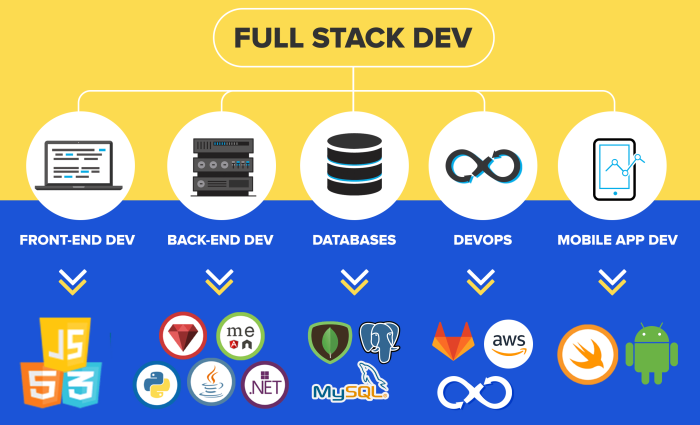
Full-stack web development represents a powerful blend of front-end and back-end expertise, enabling developers to craft complete web applications from concept to deployment. This multifaceted discipline demands a broad skillset, encompassing everything from user interface design and user experience considerations to server-side logic and database management. Understanding this holistic approach is crucial for building robust, scalable, and engaging web experiences.
This guide delves into the core principles and practices of full-stack development, exploring the key technologies involved, common workflows, and essential tools. We’ll examine both the front-end and back-end landscapes, highlighting popular frameworks and languages, and offering insights into the collaborative processes that underpin successful projects. By the end, you’ll possess a clearer understanding of the multifaceted nature of full-stack development and its significance in today’s digital world.
Defining Full-Stack Web Development

Full-stack web development encompasses the entire process of building and maintaining a website or web application, from the user interface to the server-side logic and database. It involves a broad skillset, allowing developers to work across all layers of the technology stack. This holistic approach offers significant advantages in project management, communication, and problem-solving.
Key Skills and Technologies in Full-Stack Development
Full-stack developers possess a diverse range of skills, bridging the gap between front-end and back-end development. Proficiency in multiple programming languages, frameworks, and databases is crucial. They must also understand design principles, user experience (UX), and database management. A strong grasp of version control systems like Git is essential for collaborative development.
Comparison of Full-Stack, Front-End, and Back-End Development
Full-stack development differs significantly from front-end and back-end development in its scope. Front-end developers focus solely on the user interface and user experience, working with technologies like HTML, CSS, and JavaScript. Back-end developers concentrate on the server-side logic, databases, and APIs, often utilizing languages like Python, Java, or Node.js. Full-stack developers, on the other hand, are proficient in both areas, allowing them to handle all aspects of a web application’s development.
This comprehensive understanding fosters better collaboration and a more streamlined development process.
Common Technologies Used in Each Layer
The following table Artikels common technologies used in front-end, back-end, and database development:
| Layer | Technology | Example | Description |
|---|---|---|---|
| Front-End | HTML | <p>This is a paragraph.</p> | Defines the structure of a webpage. |
| Front-End | CSS | body background-color: #f0f0f0; |
Styles the visual presentation of a webpage. |
| Front-End | JavaScript | alert("Hello, world!"); |
Adds interactivity and dynamic behavior to webpages. |
| Back-End | Node.js | (JavaScript runtime environment) | A popular JavaScript runtime environment for building server-side applications. |
| Back-End | Python | print("Hello, world!") |
A versatile language used for back-end development and data science. |
| Back-End | Java | public class Main ... |
A robust language widely used for enterprise-level applications. |
| Database | MySQL | Relational Database Management System (RDBMS) | A popular open-source relational database management system. |
| Database | MongoDB | NoSQL Database | A popular NoSQL database, suitable for large-scale applications. |
| Database | PostgreSQL | RDBMS | A powerful open-source relational database known for its extensibility. |
Front-End Technologies in Full-Stack Development
The front-end of a web application is what the user directly interacts with – the visual elements, the layout, and the overall user experience. Mastering front-end technologies is crucial for any full-stack developer aiming to build engaging and user-friendly applications. This section delves into the core technologies and popular frameworks that shape the modern front-end landscape.
The Role of HTML, CSS, and JavaScript
HTML (HyperText Markup Language), CSS (Cascading Style Sheets), and JavaScript are the foundational pillars of front-end development. HTML provides the structure of a webpage, defining elements like headings, paragraphs, images, and links. CSS handles the visual presentation, controlling aspects such as colors, fonts, layout, and responsiveness. JavaScript adds interactivity and dynamic behavior, enabling features like animations, form validation, and real-time updates.
These three languages work together synergistically to create a complete and functional user interface. For instance, HTML structures a button, CSS styles it with color and size, and JavaScript adds the functionality of triggering an action when clicked.
Popular Front-End Frameworks: React, Angular, and Vue.js
Choosing the right framework significantly impacts development speed and application scalability. React, Angular, and Vue.js are three leading contenders, each with its own strengths and weaknesses.
The following table compares these popular frameworks:
| Feature | React | Angular | Vue.js |
|---|---|---|---|
| Learning Curve | Relatively easier, component-based approach | Steeper learning curve, requires understanding of TypeScript and Angular CLI | Gentle learning curve, easy to integrate into existing projects |
| Performance | Excellent performance due to virtual DOM | Good performance, but can be heavier than React or Vue.js for smaller applications | Excellent performance, lightweight and fast |
| Community Support | Massive and active community, abundant resources | Large and well-established community | Growing rapidly, with a supportive and helpful community |
| Scalability | Highly scalable, suitable for large and complex applications | Highly scalable, designed for large enterprise applications | Highly scalable, suitable for various project sizes |
| Ecosystem | Rich ecosystem of third-party libraries and tools | Extensive ecosystem provided by Google | Growing ecosystem with many useful libraries and tools |
Examples of How Front-End Technologies Enhance User Experience
Well-crafted front-end technologies significantly impact user experience. For example, responsive design, powered by CSS media queries, ensures a seamless experience across different devices (desktops, tablets, and smartphones). JavaScript-powered animations and interactive elements can make websites more engaging and enjoyable to use. The use of progressive web app (PWA) technologies allows for offline functionality and faster loading times, improving user satisfaction.
Furthermore, intuitive navigation and clear visual hierarchy, facilitated by HTML and CSS, make it easier for users to find information and complete tasks efficiently.
Simple Webpage Layout Using HTML and CSS
Let’s design a simple webpage with a header, a main content area, and a footer.
The HTML structure would look like this:
<!DOCTYPE html><html><head> <title>Simple Webpage</title> <link rel="stylesheet" type="text/css" href="style.css"></head><body> <header> <h1>My Webpage</h1> </header> <main> <p>This is the main content area.</p> </main> <footer> <p>Copyright 2024</p> </footer></body></html>
The corresponding CSS (style.css) would style these elements:
body font-family: sans-serif; margin: 0; padding: 0;header background-color: #f0f0f0; padding: 20px; text-align: center;main padding: 20px;footer background-color: #f0f0f0; padding: 10px; text-align: center;
This simple example demonstrates how HTML structures the page content and CSS styles its appearance. The rationale behind this structure is to create a clear and logical layout, separating the header, main content, and footer into distinct sections for better organization and maintainability. This approach follows best practices for semantic HTML and ensures the webpage is easy to understand and modify.
Back-End Technologies in Full-Stack Development
The back-end of a web application is the engine that powers the user interface. It handles data storage, processing, and server-side logic, making the front-end experience possible. Choosing the right back-end technologies is crucial for building scalable, secure, and efficient web applications. This section explores popular back-end programming languages and database systems, essential components of any robust full-stack development project.
Several key technologies form the backbone of most back-end systems. These include programming languages that handle the application logic, databases that store and manage data, and APIs that facilitate communication between different parts of the application.
Popular Back-End Programming Languages
Python, Node.js, Java, and PHP are among the most widely used back-end programming languages. Each offers unique strengths and weaknesses, making them suitable for different types of projects. Python, known for its readability and extensive libraries, is often preferred for data science and machine learning-integrated web applications. Node.js, built on JavaScript, allows for efficient real-time applications due to its non-blocking, event-driven architecture.
Java, a robust and mature language, is commonly used in enterprise-level applications demanding high scalability and reliability. PHP, a long-standing language in web development, remains popular for its ease of use and large community support. The choice of language often depends on factors like project requirements, developer expertise, and existing infrastructure.
The Function of Databases in Web Applications
Databases are the heart of most web applications, responsible for storing and managing the application’s data. They ensure data persistence, allowing information to be accessed and updated consistently. Two primary types of databases exist: SQL and NoSQL. SQL databases, such as MySQL, PostgreSQL, and SQL Server, use structured query language to interact with data organized in tables with rows and columns.
This structured approach is ideal for applications with well-defined data models and relational integrity constraints. NoSQL databases, on the other hand, offer more flexible data models, accommodating unstructured or semi-structured data. MongoDB, Cassandra, and Redis are examples of popular NoSQL databases often used in applications requiring high scalability and flexibility. The choice between SQL and NoSQL depends on the specific needs of the application, considering factors such as data structure, scalability requirements, and query patterns.
Comparison of Database Management Systems
The selection of a database management system (DBMS) significantly impacts application performance and scalability. Here’s a comparison of some key characteristics:
- Data Model: SQL databases utilize a relational model, enforcing data integrity through relationships between tables. NoSQL databases offer various models, including document, key-value, graph, and column-family, providing flexibility for diverse data structures.
- Scalability: SQL databases can scale vertically by increasing the resources of a single server, while NoSQL databases often scale horizontally by distributing data across multiple servers, enabling better handling of large datasets and high traffic.
- Data Consistency: SQL databases prioritize ACID properties (Atomicity, Consistency, Isolation, Durability), ensuring data integrity and reliability. NoSQL databases often prioritize availability and partition tolerance over strict consistency, suitable for applications where some data inconsistency is acceptable.
- Query Language: SQL databases use SQL, a standardized query language, offering powerful querying capabilities. NoSQL databases typically use their own query languages, which can be less standardized and less powerful than SQL.
- Use Cases: SQL databases are well-suited for applications with well-defined data models and complex relationships, such as e-commerce platforms or financial systems. NoSQL databases are often preferred for applications requiring high scalability, flexibility, and real-time data processing, such as social media platforms or content management systems.
Implementation of a Simple API Endpoint using Node.js
This example demonstrates a simple API endpoint using Node.js and Express.js to retrieve a list of users.
First, you would need to install the necessary packages: npm install express. Then, the following code creates a simple server that responds to a GET request at the /users endpoint:
const express = require('express');
const app = express();
const port = 3000;

const users = [
   id: 1, name: 'John Doe' ,
   id: 2, name: 'Jane Smith'
];

app.get('/users', (req, res) =>
  res.json(users);
);

app.listen(port, () =>
  console.log(`Server listening on port $port`);
);
This code defines an array of users and an endpoint that returns this array as JSON when accessed. This is a basic example; a real-world API would incorporate more robust error handling, database interaction, and security measures.
Full-Stack Development Workflow and Processes
Building a successful web application requires a well-defined workflow that integrates front-end, back-end, and database development. This section Artikels the key stages involved, highlighting the importance of collaboration and efficient deployment strategies. A systematic approach ensures a smoother development process and a higher-quality final product.
Step-by-Step Guide for Building a Simple Web Application
Developing a simple web application involves a structured approach. Each stage builds upon the previous one, culminating in a functional application. This process can be adapted and scaled for more complex projects.
- Requirements Gathering and Planning: Define the application’s purpose, features, and target audience. Create wireframes or mockups to visualize the user interface.
- Database Design: Design the database schema, including tables, fields, and relationships. Choose a suitable database management system (e.g., MySQL, PostgreSQL, MongoDB).
- Back-End Development: Develop the server-side logic, APIs, and data access layer. This typically involves choosing a back-end framework (e.g., Node.js, Python/Django, Ruby on Rails) and writing the code to handle data processing and requests.
- Front-End Development: Develop the user interface using HTML, CSS, and JavaScript. Integrate the front-end with the back-end APIs to fetch and display data.
- Testing: Thoroughly test the application’s functionality, performance, and security. This includes unit testing, integration testing, and user acceptance testing.
- Deployment: Deploy the application to a hosting platform (e.g., AWS, Google Cloud, Heroku). This involves configuring the server, database, and application settings.
The Importance of Version Control (Git) in Collaborative Development
Git is a distributed version control system that is crucial for collaborative development. It allows multiple developers to work on the same project simultaneously, track changes, and merge their work efficiently. This reduces conflicts and ensures a consistent codebase.Git’s features, such as branching, merging, and pull requests, facilitate collaborative development by allowing developers to work on separate features concurrently without interfering with each other’s progress.
The ability to revert to previous versions is also a critical safety net. For example, a team working on a large e-commerce website might use Git to manage different features (e.g., shopping cart, payment gateway, product catalog) developed by different teams simultaneously. Each team can work on its branch, merge their changes when ready, and revert to previous versions if needed.
Deploying a Web Application to a Hosting Platform
Deploying a web application involves transferring the application’s code and data to a hosting platform. The specific steps depend on the chosen platform and technologies used. However, the general process involves these stages:
- Choosing a Hosting Platform: Select a hosting platform based on application requirements (e.g., scalability, cost, features).
- Setting up the Server: Configure the server environment (e.g., operating system, web server, database).
- Deploying the Code: Transfer the application’s code to the server using methods like FTP, Git, or deployment tools.
- Configuring the Database: Set up the database on the server and import the application’s data.
- Testing and Monitoring: Test the application’s functionality on the live server and monitor its performance.
Flowchart Illustrating the Stages of a Typical Full-Stack Development Project
A flowchart visually represents the sequential steps in a typical full-stack development project.
Imagine a flowchart with boxes representing each stage: Requirements Gathering -> Design (UI/UX, Database) -> Development (Front-End, Back-End) -> Testing -> Deployment -> Maintenance. Arrows connect each box, showing the flow of the project. Each box could be further broken down into smaller sub-tasks. For example, “Development” could be split into “Front-end Development” and “Back-end Development,” each with its own sub-tasks. The flowchart highlights the iterative nature of development, with feedback loops between testing and development.
Web Development (Broader Context)
Web development encompasses a vast and ever-evolving landscape, far exceeding the scope of just full-stack development. Understanding this broader context provides crucial perspective for aspiring and established developers alike, highlighting the interconnectedness of various specializations and the dynamic nature of the field. This section will explore the diverse specializations within web development, trace the evolution of its technologies, examine impactful innovative projects, and emphasize the critical role of security.Web development, in its broadest sense, involves the creation and maintenance of websites and web applications.
This multifaceted field is broken down into various specializations, each demanding unique skill sets and expertise.
Specializations within Web Development
The web development landscape is comprised of several key specializations, often overlapping and collaborating. These include front-end developers, focusing on user interface and user experience (UI/UX); back-end developers, handling server-side logic and databases; full-stack developers, bridging both front-end and back-end; UI/UX designers, specializing in user interface and user experience design; database administrators, managing and maintaining databases; DevOps engineers, focusing on the deployment and maintenance of web applications; and security engineers, ensuring the security and protection of web applications and data.
Each role plays a crucial part in the development lifecycle, contributing to the overall success of a web project.
Evolution of Web Development Technologies
The history of web development is marked by significant technological advancements. Early websites were primarily static, relying on HTML for structure and content. The introduction of Cascading Style Sheets (CSS) allowed for improved styling and presentation, while JavaScript enabled dynamic interactivity. The advent of server-side scripting languages like PHP, Python, and Ruby on Rails facilitated the creation of dynamic websites and web applications.
More recently, the rise of frameworks and libraries like React, Angular, and Vue.js has streamlined front-end development, while Node.js has revolutionized back-end development with its JavaScript-based approach. The emergence of mobile-first design principles and responsive web design has also significantly impacted how websites are built and experienced across diverse devices. The continued evolution towards progressive web apps (PWAs) and the increasing adoption of serverless architectures showcase the ongoing dynamism of the field.
Innovative Web Development Projects and Their Impact
Several innovative web development projects have profoundly impacted how we interact with the digital world. For instance, the development of Google Maps revolutionized navigation and location-based services, impacting transportation, logistics, and tourism. The creation of social media platforms like Facebook and Twitter has transformed communication and information sharing on a global scale, influencing social interactions and political discourse.
E-commerce platforms such as Amazon and Alibaba have reshaped retail, impacting consumer behavior and global trade. These examples highlight the transformative potential of innovative web development, influencing various aspects of modern life.
Security Considerations in Web Development
Security is paramount in web development. Neglecting security measures can lead to significant consequences, including data breaches, financial losses, and reputational damage. It’s crucial to implement robust security practices throughout the entire development lifecycle.
- Common Security Vulnerabilities:
- SQL Injection: Malicious SQL code injected into input fields to manipulate database queries.
- Cross-Site Scripting (XSS): Injecting malicious scripts into websites to steal user data or hijack sessions.
- Cross-Site Request Forgery (CSRF): Tricking users into performing unwanted actions on a website they are already authenticated to.
- Session Hijacking: Stealing a user’s session ID to gain unauthorized access to their account.
- Denial-of-Service (DoS) attacks: Overwhelming a server with traffic to render it unavailable.
- Mitigation Strategies:
- Input Validation and Sanitization: Thoroughly validating and sanitizing all user inputs to prevent injection attacks.
- Secure Coding Practices: Following secure coding guidelines to minimize vulnerabilities.
- Regular Security Audits and Penetration Testing: Identifying and addressing vulnerabilities proactively.
- HTTPS and SSL/TLS Certificates: Encrypting communication between the client and server to protect sensitive data.
- Strong Authentication and Authorization: Implementing robust authentication mechanisms and access controls.
- Regular Software Updates and Patching: Addressing known vulnerabilities promptly.
Tools and Technologies for Full-Stack Developers
Full-stack developers require a diverse toolkit to manage both front-end and back-end development. Proficiency in various tools and technologies is crucial for efficient workflow, debugging, and ultimately, delivering high-quality web applications. This section Artikels essential tools and technologies, the importance of debugging and testing, the process of setting up a local development environment, and a comparison of different testing methodologies.
Essential Tools and IDEs
A robust set of tools significantly enhances a full-stack developer’s productivity. Integrated Development Environments (IDEs) provide a centralized platform for coding, debugging, and testing, while other tools aid in version control, project management, and deployment.
- Integrated Development Environments (IDEs): Visual Studio Code, Sublime Text, Atom, WebStorm, and IntelliJ IDEA are popular choices, offering features like code completion, debugging tools, and extensions for various languages and frameworks. The choice often depends on personal preference and project requirements.
- Version Control Systems (VCS): Git is the industry standard for managing code changes. GitHub, GitLab, and Bitbucket are popular platforms for hosting and collaborating on Git repositories.
- Package Managers: npm (Node Package Manager) and yarn are essential for managing JavaScript dependencies. Similar package managers exist for other languages like Python (pip) and Ruby (gem).
- Databases: Familiarity with relational databases (like MySQL, PostgreSQL) and NoSQL databases (like MongoDB, Cassandra) is vital for handling application data.
- Testing Frameworks: Jest, Mocha, Cypress, Selenium are examples of popular testing frameworks used for various types of testing (unit, integration, end-to-end).
- Cloud Platforms: AWS, Google Cloud Platform (GCP), and Microsoft Azure provide infrastructure for deploying and managing web applications. Understanding cloud concepts is increasingly important for full-stack developers.
Debugging and Testing in Web Development
Debugging and testing are integral parts of the development lifecycle, ensuring the quality and reliability of web applications. Thorough testing helps identify and resolve bugs early, preventing costly issues later in the development process. Debugging involves identifying and fixing errors in code, while testing verifies that the application functions as expected.
Setting Up a Local Development Environment
Setting up a local development environment involves installing necessary software and configuring settings to mimic the production environment. This allows developers to build and test applications locally before deploying them to a server. The specific steps vary depending on the chosen technologies, but generally involve:
- Installing a code editor (like VS Code).
- Installing a version control system (like Git).
- Installing Node.js and npm (or yarn).
- Setting up a local database (like MySQL or PostgreSQL).
- Installing any required frameworks or libraries.
- Configuring a local web server (like Apache or Nginx, or using tools built into frameworks like Node.js).
Comparison of Testing Methodologies
Different testing methodologies cater to various aspects of web application development, ensuring comprehensive quality assurance.
- Unit Testing: Tests individual components or modules of the code in isolation. Focuses on verifying the correctness of small, independent units.
- Integration Testing: Tests the interaction between different modules or components of the application. Ensures that modules work correctly together.
- End-to-End (E2E) Testing: Tests the entire application flow from start to finish, simulating real-user scenarios. Verifies the overall functionality and user experience.
- Regression Testing: Tests the application after changes or updates to ensure that existing functionality remains intact. Helps prevent the introduction of new bugs.
- Performance Testing: Tests the application’s response time, scalability, and stability under various load conditions. Ensures the application can handle expected user traffic.
Mastering full-stack web development requires dedication and continuous learning, but the rewards are significant. The ability to design, develop, and deploy complete web applications empowers developers to shape the online landscape, creating innovative solutions that address diverse needs. This comprehensive approach fosters a deep understanding of the entire development lifecycle, leading to more efficient problem-solving and ultimately, more impactful web applications.
The future of web development rests on this holistic approach, promising even more dynamic and interactive online experiences.
FAQ Resource
What is the average salary for a full-stack developer?
Salaries vary widely based on experience, location, and specific skills. However, full-stack developers generally command competitive compensation.
How long does it take to become a full-stack developer?
The time required depends on prior experience and learning intensity. Dedicated learning can lead to proficiency within a year or two, though continuous learning is essential.
What are the best resources for learning full-stack development?
Numerous online courses, bootcamps, and documentation resources exist. Choosing resources aligned with your learning style and goals is crucial.
What are some common career paths for full-stack developers?
Full-stack developers can pursue roles such as web developer, software engineer, and even entrepreneurial ventures.


